Thursday, June 11, 2009

Raptr


As you can see I've added this badge to the sidebar on the right. I've recently discovered Raptr from a blog post on Webware on cnet.com.

Raptr is a really cool Social Network type Web App for Gamers. So this is basically the sort of thing that sucks me into it. The cool thing about this is that you download the desktop app and it will find all the games on your computer, index them, and search for updates and patches to them. It can also integrate into your Xbox Live account so that it knows when you log on to your Xbox and can show your friends what your playing. You can also have it update your Twitter, Facebook Status, etc when you play games or when you unlock achievements. It will even report games and achievements from Steam, WOW and other games/services.

When you sign up and link your Xbox Live account and download the client. It will go ahead and find the games you've played on Xbox and your computer and add them to "My Games" on your profile. From here it will tell you other people that are playing the games you're playing and will also help you find other games that you might like.

Raptr is still in beta, but it is definitely worth checking out. Sign up for an account, associate all your other accounts and download the desktop client. It will seriously only take 10-15 min and is well worth it. As usual let me know what you think in the comments section.

Tuesday, February 17, 2009

King's Bounty: The Legend


This game is one of the most fun games I've played in a while. I really don't play that many PC games, but I just can't put this game down. I especially like the real time Adventure mode and the turn based Combat. The tutorial for the game is adequate but lacking. For instance, you can right click on enemies and it will tell you how much chance you have of winning (Slightly Weaker, Match, Slightly Stronger, Impossible). There are a few other things that could be explained in the tutorial that you are left to figure out. However, this is also an aspect of the game I love. It doesn't hold your hand at all.

From the very beginning there are enemies around you that you will have no problem defeating and there will be enemies that you will have to face much later in the game. Also as you level up, the enemies stay at the same level of difficulty as they were before so you can come back later and have no problem with them. Another great thing is that if you fight an enemy and lose you can come back to that enemy and any troops that you defeat will not respawn in their army.

This game really has a lot of depth and is very fun to play. I definitely think that everyone should at least check out the demo and $29.99 isn't really that bad for a game even if you aren't crazy about it.

Wednesday, January 21, 2009

Arduino Oscilloscope


If you are interested in electronics and haven't heard about Arduino yet then you should definitely check it out. I got a Duemilanove for Christmas and it's been great fun so far. Before I bought the Harmony 880 the wheels in my head started spinning, I was thinking about how I could use Arduino to make a Universal Remote. I found an article that discussed how to start making one and what the code would look like. Sadly I don't have an oscilloscope and don't plan on spending the money for one anytime soon either. With more wheels turning I researched making an oscilloscope with the Arduino and found another article on how to do this. So now I'll show you what I've done so far to create an Arduino Oscilloscope.

First you do need to have the Arduino IDE and Processing installed on your machine (both pieces of software will run on PC, Mac and Linux). Then go to the Poor Man's Oscilloscope post and download the .PDE file that holds the processing and Arduino code. Open that file with a text editor and copy the bottom section that starts after the line
          '// The Arduino code.'
and paste that into the Arduino IDE. Now you need to hook the Arduino up to the computer and upload the sketch to the board. If this is the first sketch you are uploading I would suggest buying 'Getting Started with Arduino' by Massimo Banzi (one of the creators of the Arduino Board). There is also a getting started guide on the Arduino website. Select your operating system on the left side and that will get you up and running.

Now you need to add your sensor to Analog Pin 0 and the Vin pin. If you are trying to make an IR Decoder for the Universal Remote project you will you the IR Phototransistor into the board.

Now close the Arduino IDE and open Processing. Start a new sketch and paste in the top portion of the code from the .PDE file you downloaded (This will be all but the part we used before). You may have to change the serial port number depending on what port your Arduino is plugged into on your computer. Count the number of ports above the one you are using to connect your Arduino (not including the Arduino port) and change the line that reads:
          'port = new Serial(this, Serial.list()[0], 9600);'
change [0] to however many ports are above the one you used in the Arduino IDE to connect to the board. Run the Processing sketch and it should show you a real time graph of the input. It would probably be a good idea to test the program by doing something similar to the video above. Insert an LED and turn the lights on and off to see if you get any movement in the graph.

That should be about all you need to know. Use the comment section to discuss how you modified this project or any other Arduino projects that you've been working on.

Tuesday, January 13, 2009

Logitech Harmony 880


If you don't know the Harmony is Logitech's line of Universal Remotes. I found a Harmony 880 refurbished on Amazon.com for a decent price. The 880 features an LCD screen 4 soft buttons and plenty of hard buttons to control all of your normal remote features (numbers, play, rewind, fast forward, pause, etc). The remote can control up to 15 devices and can be programmed to perform up to 255 activities.
Activities are basically anything you want the remote to do. Examples could be to watch TV, watch a movie, listen to CD, play game, or pretty much anything you can think of. When you first open the Harmony remote you have to let it charge for a while until the battery is full. The remote does come with a charging cradle that you sit the remote in while it's not in use. Then connect the remote to your computer with the provided cable and launch the Harmony software. You do need to be connected to the internet for the software to launch because it needs to get the remote codes from an on-line database. After you enter your devices the wizard will help you set up the activities that you might do with the components you've entered. If you need to add any more the wizard can help you with that too. Also, if the software can't find remote codes for one of your devices or is missing a feature from the remote it can learn from your old remote by holding it up to the Harmony and pressing the button.
Once you get the remote set up like you want you just point it at your entertainment system and press an activity button. It will turn on all the right components and turn them to the right inputs for the specified activity, with just one press of a button. If something doesn't work correctly you can hit the help button and it will ask you questions and send out remote functions to try and correct the problem. You might have to do this the first time you use a function because the remote won't know which input a specified component is on, but it will remember from then on. This remote works really well and I've had no problems whatsoever out of it. I love it and it really does replace all four of the remote that I previously had to deal with. I would highly recommend this remote to anyone who has to use multiple remotes on a daily basis and especially anyone that has trouble remembering how to turn on all the components in your living room.

Monday, December 1, 2008

Light Speed Panel

If you have been reading this blog for any amount of time now you should know that I really like free stuff. Who doesn't, right? Well, I've found a new way to get free stuff, Light Speed Panel. With LSP you can take consumer surveys and earn free stuff. Most of the surveys only require 15-25 minutes of your time and you can ear from 75-150 points per survey, some surveys that are longer could even earn you up to 500 points for only 30 minutes of your time.
You may be wondering how much these points are worth, right? Well, 550 points will get you a $5 Amazon.com giftcard and 575 points will get you $5 straight into your Paypal account. There are some other really great offers for participating in surveys. Also for every survey you take you are entered into a monthly drawing for $5,000.
I even took a survey the other day that offered $50 if I was willing to participate even further. They are going to send me a special palm pilot to keep track of all tv snacks I eat for 2 weeks. To me that is definitely worth $50. I really like this site and think you should definitely check it out.

Friday, November 14, 2008

Amazon Video on Demand


I've recently fell in love with The Office, not the one I work at, but the one on NBC every Thursday night at 9:00 PM E. Since I'm just now tuning in I wanted to catch up with some previous episodes. Buying the DVDs is costly, Season 1 costs $22.99 on Amazon.com, and only six episodes aired that season. I found a way around this, however.

Pepsi Points was my answer. I've never been a big Pepsi fan, I would choose Coke if given the option, but I never really cared which carbonated beverage was washing down my lunch. That was not until I saw the Amazon.com logo plastered on the Pepsi bottle (The amazon logo has since been removed) which piqued my interested. I decided to start buying Pepsi products from the vending machine at work and see what I could actually get with Pepsi Points (I had been collecting Coke caps, but the promotions were either a) lame, b) too expensive (read: I couldn't drink that much coke in my life) or c) drawings which I knew I could never win). I soon discovered that with 5 Pepsi Points (1 point per cap) I could download most any MP3 on the Amazon.com MP3 store (totally DRM Free by the way), or with 12 points I could download an episode of a TV show. Since then I have been continuously collecting Pepsi Caps (even to the extent of picking them up when in public) so that I could earn more music and TV shows.

The experience of the Amazon Video on Demand store (previously the Amazon Unbox store) is pretty seamless. It's not the best ever but it is better than most for what it does. First you have to download the software from Amazon.com. Then you go to Amazon's Video on Demand store and select the video(s) you want to download, choose your method of payment and to which PC you want to download them to. You can also choose to watch the videos online without downloading the software if you wish. Once the videos download to your computer you can watch them whenever you want on your computer or use a Windows Media Extender like the Xbox360 to view the videos. The videos do carry a heavy DRM lock unlike the Amazon MP3 experience. Some of the frustrating things for me about the expirience is that you can't just transfer the videos to another computer; you have to download them again (there is an option to import videos into your library, but you have to be connected to the internet because of the DRM restrictions). Another problem is that I can't watch the videos on my iPod Touch. There is a mobile transfer option and I thought that I could watch them on my Samsung a727 phone which wouldn't be optimal, but it would be an alternative. However, the videos wouldn't play on my phone for some unknown reason. Amazon does offer help on the mobile option and provides a list of Microsoft certified Play for Sure devices if you happen to have one of those.

All in all this service is great as I can watch my videos in a good resolution on my TV through the Xbox360 media extender, but I would like to be able to watch these on my iPod. I don't see that happening in the near future, though, because I can see how that would be a conflicting interest for Apple as they already offer these videos in their store.

Friday, October 24, 2008

iPod Touch/iPhone Apps


Well, I got my iPod Touch Wednesday as an early Christmas present and after extensively playing with it I would like to give you my top 5 Free Applications (Hey, i'm cheap okay).

1) Mighty Docs - With Mighty Docs you can view your documents and spreadsheets from Google Docs. The great feature about Mighty Docs is that it caches the documents and spreadsheets when you open then. That way when you don't have an internet connection you can still view your documents. I love this application, it works great and is pretty fast too. Some updates I'd like to see in the future would be ability to edit documents and spreadsheets (create them also) and save changes to server when you are connected. I'd also like to see presentation functionality which I believe is being developed now. You definitely need this app if you use Google Docs.

2) Remote - I believe this application was developed my Apple. The application is simple, connect your iPod Touch/iPhone and computer to a local network and turn on iTunes on the computer. The first time that you use the app for your library it will give you a four number passcode to enter on the computer to verify the connection. From then on it remembers the library and works like a charm. All of your playlists are shown in the application or you can browse your media by artist, album, etc. This app works great if you use a media server or a home theater PC. I really like this application.

3) Facebook - This application is nice and polished. Basically, if you like using Facebook then this app will be natural for you. If you use Facebook then there is no reason for you not to get this app.

4) Movies - Movies is a great application. The front screen brings up movies that are released that week, and then other movies still hot in the box office and then lesser known movies still playing in theaters. You can search for theaters near your location and select your favorites. Movie times are also listed for all available theaters. When you select a movie more information is given about it and some movies have the ability to play the trailer for you. This is a nice clean app that easily lets you select your entertainment choices for the night.

5) Twitterific - This is a really good Twitter app. You can view your friends' tweets and post your own. You can also view all tweets if you choose. There's nothing spectacular about this app, but it is pretty good.

Bonus: I also liked the game Fuzzle. It's a really neat free game that will take up lots of your time. The Labyrinth lite edition is pretty good also, I'll probably wind up buying the full version of that.

Post in the comments and let me know what your favorite apps are.

Tuesday, October 7, 2008

Microsoft Expression Blend

Until recently the way Microsoft allowed you to design windows programs with .NET was called Windows Forms and this feature set of familiar looking tools was built into Visual Studio (which is a relatively expensive program but makes editing code much easier). Now Microsoft has released Expression Blend, the new way to create Windows Applications. Guess what, Expression Blend is a completely separate program from Visual Studio. You know what else, you can't edit your code directly from Expression Blend either now. So if you want to use the newest Microsoft technologies you have to fork out the money for both programs.
Now that I've got that out of my system I'd like to introduce you to creating Windows Applications with Expression Blend through what Microsoft calls WPF or Windows Presentation Foundation. Essentially you don't need Blend to create forms through WPF but it's a lot easier if you do. CoDe magazine online has a great article that helped me get started using WPF called WPF meets iPhone. This tutorial takes you through the steps of creating a new project from scratch making an interface similar to the iPhone. The online article has everything you need except Expression Blend and C# 2008 Express or VB Express (depending on which language you prefer, the tutorial offers code samples for each) including the C# and VB source code and all the resources needed. Following the article isn't hard and taught me enough to start creating my own forms with Expression Blend.
If you like this article and use Microsoft Technologies for your programming I would highly suggest subscribing to the magazine. You can read a lot of the content online, but as usual subscribers usually get a little more content.
Try and put your own twist on the iPhone interface and

Thursday, September 25, 2008

Google Tools

Ok, I discovered this a while ago but haven't used it much or discovered how powerful it is until recently. Google has a list of products that are very useful. Some of those that I have been experimenting with are Gmail, Google Docs, Reader, and Calendar.
Gmail is a very popular web based e-mail system. It is pretty comparable to other web based e-mail systems out there (Yahoo, Hotmail, etc). I haven't used Gmail extensively but it works. I don't know why it's still in beta, but it will probably be in beta forever. Don't let that stop you from using it, as far as I can tell it's fully feature complete.
Google Docs is really the tool that I think is so cool. With Docs you can upload an array of files or create your own files right on the web. With Docs you can store Documents, Spreadsheets, and Presentations. You can upload files of type DOC, RTF, ODT, SXW, TXT, PPT, PPS, CSV, XLS, ODS, PDF, and more. After you upload the files you can view and edit them online. You can also create Documents, Spreadsheets, and Presentations online. After you create or edit your uploaded files you can download them in any of the different formats that apply. You no longer need Microsoft Word to create a word document and send to your professor. You can create a document online and download it as a .DOC file and send it to your teacher. You could also upload an Open Office document and download it as a Microsoft Office document or vice-versa with any of the types.
Reader is an RSS reader just like the one integrated into your web browser or e-mail program. An RSS reader is something that is really lacking from Google's Chrome browser but they do have a web service for it. Google reader is a straight forward RSS reader. When you pull it up it will show all of the posts agregated and sorted by date. All of the different feeds are listed down the left side and clicking on one will show the posts for that feed sorted by date.
Calendar works similarly to the calendar that is built into Microsoft Outlook. You can add events, set reminders, and repeat events in a multitude of ways. The whole experience is very intuitive. You can embed the calendar in your website or export it to iCal, XML, or HTML formats. You can also add multiple calendars and share calendars with friends.
There are many more tools on Google's product site. All of these tools are great and useful. One thing that I would like to see would be these services integrated into Google's Browser. How great would it be if I could actually read my RSS feeds when I'm offline which I currently can't do with Chrome. Also it would be awesome to open and edit documents while offline because Chrome cached them. I would also like to be able to check my calendar without logging in to Google to do so. I'm just saying that would be a super nice feature. The really great thing about all these services is that you can use them from any computer when you log into Google.

Tuesday, September 9, 2008

Google Chrome

Well, Google Chrome has been out for a few days now and I have to say I like it. If you've been keeping up with my posts you should know that I regularly use Opera as my web browser. So far I don't think that has changed. Chrome is laking some very important features that Opera includes, such as syncing bookmarks, no Mac support, and a built in RSS reader just to name a few. I do like how the bookmarks are set up similar to Safari. As far as the RSS feeds go I've been getting by using Google Reader online, but sometimes I'm not connected to the internet (Shock!) and I would like to be able to read previous posts on some blogs. With Opera I can go back and reread blog posts because it download the feed to the hard disk and I can read them when not connected. Google Reader requires a connection to the internet to load. At first I downloaded Chrome on my work computer and as soon as I tried to run it an error message came up saying that the program failed to initialize in memory and nothing would happen. So, I installed the browser on my laptop and it worked just fine. After a couple of days a solution arose on the internet. Chrome does not play well with Symantec programs. See Chrome runs each tab in a sandbox so that if one tab crashes then it will get rid of that tab and it's instance in ram, allowing the other tabs to run smoothly. Symantec doesn't like this feature and thinks that Chrome is trying to do something funny to your memory so it blocks it. How do you get Chrome to run with Symantec? Well you turn the sandbox feature off. Can you do this through the setup or options? Sadly Chrome doesn't have an option for turning off sandbox, so you have to edit the shortcut icon that links to Chrome. In the target box you have to add a space and --no-sandbox after the last quotation mark.


This will turn off the sandbox feature and allow Google Chrome to run alongside Symantec programs.
Overall I really like where Google is taking the browser experience, especially with the search feature built right into the address bar (Opera will search Google if you type in g and then the search terms). I acknowledge that Chrome is still in beta and being developed, but I can really see this going places. Is Chrome going to be my default browser, no. Will I use it and keep an eye on updates, yes.

You can download Google Chrome at Google.com/chrome

Thursday, September 4, 2008

Kids In Mind

Today I bring you Kids-In-Mind.com. If you have children, take children to movies or just like to know what the movie is rated for then this is your site. I like to know what kind of content is in a movie before I watch it, sometimes I can tell by the trailer, sometimes I can't. At Kids in Mind there is a listing of movies currently out in theaters. With a quick glance you can see the ratings for sex, violence and profanity. When you click on the movie title you can read a synopsis of the movie, and then detailed offenses in each catagory.
Under the sex category anything from kissing, touching, lovemaking or displays of skin are recorded. The good thing about the review is that it doesn't specify which characters offend or when so you don't know who is kissing who, you just know that somewhere in the movie someone kisses. If you haven't seen the movie this really shouldn't spoil it for you.
The violence/gore catagory is just as strict, any kind of physical violence or general gore (blood, guts, etc) counts. The same spoiler rules count here also so you don't know who got their head chopped off.
The profanity category simply counts the number of times certain words are used, and also catalog gestures and explain what the gestures were mentioning. This usually goes into even categorizing name calling and steryotypes.
There are also additional sections for substance use, discussion topics, and message. In the substance use section they discuss any alocohol or other drugs used or mentioned in the film. Discussion topics are a list of moral or values that are displayed or challenged in the film. Topics range from what did the character do right, how could the character have made the situation better to simple moral issues discussed in the film. The message section simply talks about the movies message and tones about certain subjects.
There are also links to the movie's official site, IMDB listing and critics.com.
The site's design is very clean and functional. There are adds on the site, but they don't get in the way and are minimal. Overal this site is very enjoyable and the best I've come across so far, if you're iffy about whether or not to see a movie I would check out this site for a content rating first.

Friday, August 15, 2008

Fantastic Contraption

I really like my blog to have pictures and/or video with the text, 'cause quite frankly pot (plain ole text) has to be pretty interesting if I'm going to read it. Too bad I can't have any pictures or videos with my post this week, but it would kind of spoil the whole subject. Now for the good stuff...

I spent most of my free time yesterday playing a game called Fantastic Contraption. The game is very simple, use five types of items (clockwise wheel, counter-clockwise wheel, neutral wheel, fluid rod, and solid rod) to make a fantastic contraption that will move an object from the start area to the goal area. Sounds simple right, trust me, it's not. What I love about this game is that the physics are pretty much spot on which is good because that's what the whole game is based on. It's really great because every control works just as you think it would (BTW save yourself some time and use the shift key when resizing and moving instead of clicking the resize button).

When you make a contraption that successfully completes a level you can save it and share it with your friends. I've saved some of mine which you can see links to at the bottom of this post. Once you get the hang of it I think it would be fun to have a challenge and see who could come up with the simplest solution to each level. Anybody up for it? Discuss it in the comments and see if we can come up with some rules for what the simplest design is. Maybe see who could get the prize in the goal quickest, who knows? Write in the comments and let me know what you think.

Here are my submissions for
Level 1, Level 2, Level 3, Level 4, Level 5, Level 6, Level 7, Level 8, Level 9, Level 10, Level 11, Level 12, Level 13, Level 14

Wednesday, August 6, 2008

Brain Den

So, you're at work and bored in front of the computer (duh! Why else would you be reading this?). Brainden.com is a place that I often wind up when I'm in this position. Please don't go there now, finish reading this post. Most of the time I just try to solve the puzzles in my head because people have already posted an answer. The thread that you see below was first solved by yours truly and the first puzzle that I solved first, btw. See what you can do with the puzzle before moving on to the website. I'll post the answer and the link to the post later (I want you to figure out the answer on your own). So here it is:

Most of today was spent in meetings with the PHB*, explaining why our project is behind schedule.

A quick virtual summary (what I imagine was said, rather than what was actually said): So anyway, it was a relief to get back to programming. As I dug into a bitmap edge detection algorithm, I ran into a spot where I needed to check the eight pixels surrounding the current one, in clockwise order, given any starting position. I whipped out a quick conditional statement that tested for each of eight possibilities, which works fine, but is ugly. Since it worked ok, I couldn't justify a lot of time to optimize it, so I gave myself five minutes to see if I could come up with a slicker way to do it. I didn't, so I moved on, but now it's 11PM and I just thought of another way to do it, and I figured it might be fun to see if anyone can find an even simpler solution.

So here's the problem ...

Consider the following diagram:


Find a single function f(x,y) that, given any one set of the eight coordinates, returns the coordinates of the adjacent square, moving clockwise. You may use any mathematical operands, including rounding, absolute value, trig functions, etc., but no conditionals.

*Pointy Haired Boss

Thursday, July 24, 2008

E3 Update


Well, we got back from Charleston Saturday. Had a blast, while we were there we went to see The Dark Night, which was awesome. The movie was so awesome that we are going to see it again, and I usually don't watch movies a second time in the theater.
Now down to the real stuff, E3 has come and gone and some really big announcements were made. Xbox 360 Dashboard will get a complete makeover in this fall's update you can read more about it on Gizmodo. The new dashboard looks so much better than the old one. Microsoft has also contracted a deal with Netflix so that you can use your Xbox 360 like a Roku box to stream movies to your TV. To use this serviceThe update will also include what looks like the Nintendo Miis where you create your own 3D avatar.
Speaking of the Wii, the major announcement for me from Nintendo was Wii Sports Resort (seen in the video above) which is almost like a sequal to the most loved Wii game Wii Sports wich came packaged with your Wii. At E3 three of the activities in Wii Sports Resort were shown: Frisbee, Jet Ski, and Sword Fighting. Wii Sports Resort will also include a new Accessory for the Wiimote called the Wii MotionPlus that will increase accelerometer controls for the new game. Hopefully this new accessory will be utilized in future games for better control with the Wiimote and more realistic gameplay.
Some other things I am excited about are Fable 2, Lego Batman, Star Wars: The Clone Wars, and a new edition of Tecmo Bowl on DS.


Click the image for more screenshots

Thursday, July 10, 2008

Geni.com

How many monkeys or nuts do you have hanging in your family tree? At Geni.com all you have to do is put in your name and e-mail address and start adding members of your family. In about five minutes I had put in almost three generations of my family. With Geni.com the whole family tree thing is easy, and you can put in your family member's e-mail so that they can sign up and add their information (B-Day, special events in their life, etc) so you can stay more in touch. The whole thing is super easy. I encourage you to start your family tree and put some family member's e-mails in there so that they can extend it and see how far you can get with it (if you go far enough you will hit a nut like my uncle who will have huge books of family tree that will be glad to spend hours putting in information from centuries ago). Try it out, what do you have to loose.

P.S. I'm getting married Saturday and will be on the honeymoon all next week so I probably won't be posting. Thanx.

Thursday, July 3, 2008

Opera 9.51

If you have downloaded Opera 9.5, you should check for updates, because v9.51 was released recently and it is supposed to update security. I would definitely recommend getting it as soon as possible. If you haven't downloaded opera yet get on over to Opera.com to download it.

Thursday, June 26, 2008

Hulu


Ever missed an episode of Lost and forgot to tell you DVR to record it, how about started to watch The Office mid season and wanted to go back and catch up on previous episodes. Hulu is a great website that lets you stream these videos and more. Hulu also has a great selection of movies that you can watch on your computer right through a little thing I like to call "The Internet." The best thing about Hulu is that you can watch as many TV shows and movies that you like for the low low price of $0/mo. That's right, by using the invention of what's known as a tasteful 30 second commercial Hulu can provide content on demand for free. The future of TV is the internet baby. The advertising is tasteful and relevant. Plus the commercials are only 20-30 seconds long and you don't have to watch fifty of them, only three or four during an hour long show and less on half hour shows. Movies are good too, as the movie isn't chopped up into ten minute segments with long commercials between each like on TV. The commercials are conservatively spaced and are hardly noticeable, as the video is streaming and has to catch up with itself every once and a while anyway. My only problem is that when I try to watch a TV show or movie over the wireless connection at my house (54 mbps Wireless G with a great connection) the videos are a bit choppy, but when watching them in the standard flash player in the browser they look fine. Check out Hulu and let me know what you think about it. Anything free can't be that bad right?

Thursday, June 19, 2008

iTunes Tip: Top 2Gb Most Played


So you've got an iPhone (or iPod Touch) and like me have well over 30Gb of media. I've been contemplating the possibility of getting an iPhone and was wondering, how am I going to manage to only carry 8Gb of media around with me. Here's the solution I came up with, create a playlist that will hold 2Gb of my most listened to songs, a playlist with 3Gb of the least often played movies, a playlist with 3Gb of the most recently added TV Shows, and a playlist that gets 25 of the most recently added songs that are not in the most played list (all of these are smart playlists btw). Then I made a playlist called Media that will randomly grab about 7.5Gb (7680Mb) of the playlists listed above. After that I plan to synch my unplayed podcast episodes and a static playlist called Misc that will hold anything that I put in it that I explicitly want to appear on my iPhone and the Media playlist. Since I usually don't have more than half of a gigabyte of unplayed podcasts this should work. You may need to adjust the numbers on some of the playlists according to your media tastes, if you don't watch TV on your iPhone then you can allocate those 3Gb to music or movies, I think you get the point. You can check my flickr page for screenshots of the playlists if you are unsure of what the settings should be. Leave a comment and let me know how your playlists worked and how the transition was to the iPhone/iPod Touch.

Tuesday, June 17, 2008

DIY iPod Charger (AKA MintyBoost)


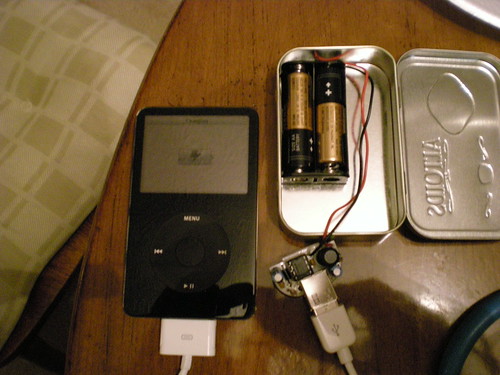
A couple of weeks ago I saw the MintyBoost on the Make Blog. I have had some experience with electronics before. I ordered a DIY guitar pedal from Build Your Own Clone. When I ordered it, it came with a Confidence Booster Circuit, which is a very simple circuit which boosts a guitar signal, sort of like a volume switch. I did pretty well on that, but I could never get the real pedal, a Tube Screamer to clone the TS-808 to work correctly. Anyway, I ordered the MintyBoost last Monday and it arrived at my house on Thursday. Friday night My Fiancee and I put the thing together. If you’ve never done an electronics project and you are interested I would highly recommend starting here. There aren’t many parts and there are no switches or knobs to worry about mounting on the case. I haven’t finished mounting the whole project in the Altoids Tin, but other than that I’ve got it completed. All in all the project will take about thirty minutes to assemble and put in the case. The assembly was very simple and easy. The charger works perfectly and automatically started to charge my iPod. I’ve posted some pics of the final result. To see more about the product you can check out Lady Ada for more information.

Opera 9.5

Here's another short for this week. Opera released a new version of their great web browser. If you haven't downloaded it yet you should. It has all of the great features that I talked about before and some more. If you've already downloaded it or when you do download it let me know in the comments, I'd like to see what you think.